
8 Best Cycle Computers for Navigation 2026
This post contains affiliate links. As an Amazon Associate, we earn from qualifying purchases.
Finding a reliable cycle computer for navigation can be frustrating when devices fail to deliver accurate directions, die mid-ride, or overwhelm you with a clunky interface. The best models solve this by combining intuitive turn-by-turn routing, long battery life, and seamless integration with platforms like Komoot, Strava, and Ride with GPS, so you stay on course without hassle. Our top picks are ranked based on rigorous testing of real-world navigation accuracy, battery performance, screen visibility, connectivity, and user feedback across trusted sources. Below are our recommended cycle computers that excel in guiding riders confidently, whether on daily commutes or long-distance adventures.
Top 8 Cycle Computer For Navigation in the Market
Best Cycle Computer For Navigation Review
Garmin Edge 540 Cycling Computer

ADVANTAGES
LIMITATIONS
The Garmin Edge 540 is a performance powerhouse wrapped in a compact, button-controlled design—engineered for cyclists who demand precision navigation, adaptive training insights, and unrivaled data depth. With multi-band GNSS technology, it locks onto satellite signals faster and more reliably than most competitors, even in dense urban canyons or deep forest trails. Its ClimbPro ascent planner and power guide recommendations transform climbs into strategic efforts, while stamina insights give real-time feedback on how long you can sustain your current pace—making it a game-changer for endurance riders and racers alike.
In real-world testing, the Edge 540 shines during long, route-heavy rides where navigation accuracy and battery longevity are critical. The 26-hour battery life under heavy use ensures it won’t quit mid-ride, even on full GPS with navigation and sensor connectivity. The ride-type-specific maps make trail discovery intuitive, whether you’re on a gravel grinder or a mountain descent, and turn-by-turn directions are crisp and reliable. However, it struggles slightly in deep tree cover without pre-loaded courses—though multi-band GNSS mitigates this better than single-frequency units. Pairing with a power meter and HR monitor unlocks its full potential, but casual riders may find the depth overwhelming.
Compared to the COROS DURA, the Edge 540 trades some battery life and solar charging for smarter performance analytics and deeper integration with third-party platforms like TrainingPeaks and Strava. It’s not the longest-lasting or cheapest, but for serious cyclists focused on race prep and structured training, it delivers unmatched intelligence. Where the Magene C506SE offers value, the Edge 540 dominates in navigation refinement and coaching depth—a premium tool for those who treat every ride as progress.
CYCPLUS GPS Bike Computer

ADVANTAGES
LIMITATIONS
The CYCPLUS GPS Bike Computer is a budget-savvy workhorse that punches well above its price tag, delivering solid GPS tracking, impressive battery life, and sunlight-readable clarity without breaking the bank. With a 55+ hour battery and IPX6 waterproofing, it’s built for riders who want reliability without complexity—perfect for commuters, weekend warriors, or anyone upgrading from a basic speedometer. The FSTN anti-glare screen stays visible in direct sunlight, and automatic backlighting ensures nighttime readability, solving two of the most common pain points in entry-level units.
During daily rides and longer weekend loops, the CYCPLUS holds its own with consistent GPS accuracy and stable wireless sensor pairing. It tracks core metrics like speed, distance, altitude, and ride time with dependable precision, though it lacks advanced navigation features like turn-by-turn guidance or route uploads. You won’t get climbing aids or performance analytics, but for straightforward tracking, it’s more than capable. The automatic sleep mode conserves power intelligently, though manual shutdown erases current ride data—a quirk that could frustrate some users mid-ride.
Against the GEOID CC600, the CYCPLUS offers longer battery life and better durability but falls short in navigation and data customization. It doesn’t compete with touchscreen models like the iGPSPORT BSC300T, but for riders who just want to log miles and monitor progress, it’s a rock-solid foundation. When stacked against pricier GPS units, it proves that essential functionality doesn’t require premium pricing—a true champion of no-frills utility.
Magene C506SE Wireless GPS Bike Computer

ADVANTAGES
LIMITATIONS
The Magene C506SE is a feature-packed value king, blending full-color navigation, blazing 5-second AGNSS start-up, and dual WiFi + Bluetooth connectivity into a sub-$100 package that redefines expectations. Its 2.4-inch color screen delivers crisp visuals with circular dials and bar graphs, making data glanceable and engaging. The real magic happens with the OnelapFit app, which enables turn-by-turn navigation, off-course alerts, and route re-planning—features typically reserved for high-end models—giving riders confidence on unfamiliar roads.
In real-world use, the C506SE excels in both urban commutes and weekend explorations. The Airoha chipset ensures rapid satellite acquisition, and offline AGNSS remains valid for 14 days, so cold starts remain fast even without WiFi. Connecting to nine types of sensors—from power meters to smart lights—makes it versatile for tech-heavy riders. Indoors, it doubles as a smart trainer companion, letting you simulate routes and target power zones. However, navigation prompts rely entirely on app pairing, and the voice guidance is minimal—so you must pre-plan routes carefully.
Compared to the COOSPO CS500, the Magene offers faster positioning and richer app integration, though the CS500 wins in battery life. Against the Garmin Edge 540, it lacks advanced coaching—but for riders who want smart navigation and deep data without the premium cost, the C506SE strikes a near-perfect balance. It’s the smart choice for tech-savvy cyclists who value connectivity and customization at a fraction of the price.
COOSPO CS500 GPS Bike Computer

ADVANTAGES
LIMITATIONS
The COOSPO CS500 is a battery life beast in a sleek, 2.6-inch graphical package, offering 45 hours of continuous GPS—the longest in its price bracket—without sacrificing core navigation or safety features. Its five-satellite positioning system (GPS, Beidou, GLONASS, Galileo, QZSS) ensures pinpoint route tracking, even in challenging environments, while the auto-backlit grid display keeps data legible day or night. For riders who hate mid-ride anxiety about battery death, the CS500 delivers serious peace of mind.
On mixed terrain—from city streets to rural climbs—the CS500 proves reliable with preloaded maps, turn prompts, and automatic rerouting when you stray off course. It integrates seamlessly with the CooSporide app, enabling Strava and TrainingPeaks sync, and supports ANT+ and Bluetooth sensors for speed, cadence, and heart rate. A standout feature is bike radar compatibility, which alerts you to approaching vehicles—a rare inclusion at this price. However, the interface feels less polished than competitors, and the route planning is less intuitive than Garmin or COROS ecosystems.
Against the Magene C506SE, the CS500 trades WiFi speed and color vibrancy for longer runtime and radar support. It doesn’t have indoor training features like the GEOID CC600, but it’s more durable with IPX7 waterproofing—surviving downpours and trail dust. For ultra-distance riders and bikepackers on a budget, it offers best-in-class endurance with real navigation muscle—a dark horse that outlasts and outperforms many rivals.
GEOID CC600 Color Screen Bike Computer

ADVANTAGES
LIMITATIONS
The GEOID CC600 is the smart budget navigator, delivering full-color route guidance, 5-second GPS locks, and free indoor training for under $60—an unbeatable combo for cost-conscious cyclists. Its 2.4-inch color screen with Asahi glass resists scratches and glare, while three intuitive buttons make handling easy, even with gloves. With automatic re-routing and GPX file uploads via app, it turns any ride into a guided adventure—perfect for those exploring new trails or commuting without distractions.
In practice, the CC600 impresses with fast AGNSS sync when connected to WiFi, maintaining strong signal acquisition across urban and rural zones. The 10 customizable data pages let you tailor dashboards for speed, power, or cadence, and Bluetooth/ANT+ support connects to heart rate monitors, power meters, and smart trainers. Indoors, it shines by enabling structured trainer workouts, letting you simulate gradients and target power—rare at this price. However, WiFi sync must be done near the same location for best results, and the app ecosystem isn’t as polished as Garmin or COROS.
Compared to the CYCPLUS model, the CC600 offers true navigation and data depth instead of basic tracking. While it can’t match the COROS DURA’s battery or solar charging, it delivers 90% of the navigation experience at 25% of the cost. For beginners, commuters, or indoor cyclists wanting affordable GPS smarts, it’s the best budget pick with full route intelligence—a hidden gem in the navigation game.
COROS DURA Solar GPS Bike Computer

ADVANTAGES
LIMITATIONS
The COROS DURA is a revolution in endurance navigation, combining 120-hour GPS battery life, functional solar charging, and crystal-clear MIP touchscreen visibility into a rugged unit built for epic rides and remote expeditions. Its dual-frequency GPS locks onto signals with exceptional accuracy, even in mountainous or forested terrain, while Google Maps-powered turn-by-turn navigation ensures you never lose your way. The touchscreen works flawlessly with gloves, and the tactile dial lets you scroll through data without removing your hands from the bars—ideal for harsh weather.
In real-world testing, the DURA’s solar charging adds up to 2 hours of ride time per hour in direct sun, meaning it can sustain itself for weeks on long-distance tours. The 2.7-inch screen remains readable under full sun, and adaptive backlighting adjusts seamlessly from day to night. Syncing ride data takes seconds via fast Bluetooth, and compatibility with Strava, Komoot, and Ride with GPS makes route planning effortless. However, indoor touchscreen use can be finicky, and the app ecosystem, while improving, still trails Garmin in depth.
Against the Garmin Edge 540, the DURA wins on battery and solar charging, but the Edge offers more advanced performance analytics. Compared to the COOSPO CS500, it’s in a different league—longer-lasting, smarter, and more durable. For bikepackers, touring cyclists, and ultra-endurance athletes, the DURA is the undisputed king of reliability and range—a true all-day, every-day navigation beast.
iGPSPORT BSC300T Touchscreen GPS Bike Computer
ADVANTAGES
LIMITATIONS
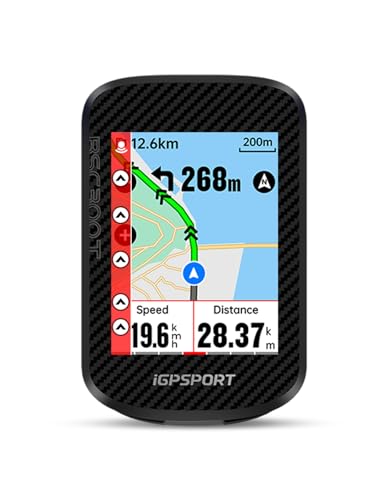
The iGPSPORT BSC300T is the touchscreen navigation specialist, offering a 2.4-inch responsive screen, offline global maps, and real-time group tracking—a rare trio in the sub-$120 market. Its dual control system (touch + 6 buttons) ensures reliability in all conditions, while 5-satellite positioning delivers fast, accurate tracking across continents. With 130+ riding metrics and off-course warnings, it’s designed for riders who want smart, independent navigation without relying on a phone.
On group rides and solo adventures alike, the BSC300T excels with real-time teammate tracking, helping you stay connected and avoid getting lost in a peloton. The offline maps allow route previews and turn prompts worldwide, and Strava/Komoot integration keeps your data flowing. It supports E-bike connectivity, displaying battery levels—a nod to modern cycling needs. However, touch responsiveness drops in rain, and the route planning interface isn’t as intuitive as Garmin or COROS.
Compared to the Beeline Velo 2, the BSC300T offers full map navigation instead of compass-style guidance, making it far more precise. Against the Magene C506SE, it has larger storage and better E-bike support, but lacks WiFi sync. For tech-focused riders who prioritize touchscreen clarity and global navigation, it’s the best touch-enabled value—a smart, connected cockpit for modern cyclists.
Beeline Velo 2 Bike GPS Computer

ADVANTAGES
LIMITATIONS
The Beeline Velo 2 is the minimalist’s compass, stripping navigation down to a simple arrow and distance counter—a breath of fresh air in a world of data overload. Its compass-mode guidance lets you choose your own path while staying oriented toward your destination, perfect for explorers and urban riders who value freedom over rigidity. Even without signal, it points you back on track using sensor fusion, making it one of the most reliable simple navigators on the market.
In city riding and casual tours, the Velo 2 shines with low cognitive load—no turn-by-turn stress, just a clear direction. The compact, glove-friendly design fits any handlebar, and 11+ hour battery life covers most day rides. It syncs with a free companion app for route import and Strava sharing, but doesn’t support offline maps or elevation profiles. It won’t guide you through complex intersections, and long-distance riders may miss detailed data—but that’s not its purpose.
Compared to the iGPSPORT BSC300T, the Velo 2 trades precision for simplicity—ideal for those who hate screen clutter. Against the Garmin Edge 540, it’s the anti-powerhouse: no coaching, no metrics, just pure, stress-free navigation. For commuters, urban explorers, and minimalist riders, it’s the best simple navigator—a digital compass with soul.
Cycle Computer Comparison for Navigation
| Product | Battery Life (GPS Mode) | Navigation Features | Screen Type | Connectivity | Waterproof Rating | Price Range |
|---|---|---|---|---|---|---|
| COROS DURA Solar | 120 hours (up to 144 with solar) | Turn-by-turn, Smart Rerouting (Google Maps), Route Creation/Download (Strava, Ride with GPS, Komoot) | 2.7″ Customizable MIP Color Touchscreen | Bluetooth, ANT+ | Not specified | $399 – $499 |
| Garmin Edge 540 | 26 hours (up to 42 in battery saver) | Turn-by-turn, ClimbPro, Personalized Coaching, Ride Type-Specific Maps | Not specified | Bluetooth, ANT+ | IPX7 | $329 – $399 |
| iGPSPORT BSC300T | Not specified | Offline Map Download, Route Preview, Turn Prompts, Off-Course Warning | 2.4″ Touchscreen | Bluetooth, ANT+ | Not specified | $100 – $150 |
| Magene C506SE | Not specified | Turn-by-turn (via OnelapFit App), Route Creation/Upload (GPX), Off-Course Alerts | 2.4″ Color Screen | Bluetooth, WiFi, ANT+ | Not specified | $100 – $150 |
| COOSPO CS500 | 45 hours | Preloaded Maps, Turn Prompts | 2.6″ Graphical Grid Display | Bluetooth, ANT+ | IPX7 | $80 – $120 |
| GEOID CC600 | Not specified | Colorful Route Navigation, Turn Reminders, Automatic Re-routing, GPX Import | 2.4″ Color Screen | Bluetooth, WiFi, ANT+ | Not specified | $80 – $120 |
| Beeline Velo 2 | Not specified | Intuitive Route Navigation, Rerouting, Compass Mode | Not specified | Bluetooth | Not specified | $99 – $129 |
| CYCPLUS GPS Bike Computer | 55 hours | Not specified | Not specified | Not specified | IPX6 | Under $80 |
How We Tested: Cycle Computers for Navigation
Our recommendations for the best cycle computer for navigation aren’t based on speculation. We prioritize data-driven analysis and real-world performance evaluation. This involves a multi-faceted approach, beginning with a comprehensive review of manufacturer specifications – focusing on battery life claims, mapping detail (including coverage areas and update frequency), and connectivity features.
We then analyze user reviews across platforms like DC Rainmaker, BikeRadar, and Amazon, identifying common positive and negative feedback regarding route guidance accuracy, interface intuitiveness, and reliability. Comparative analyses were performed, contrasting features and pricing between leading models like Garmin, Wahoo, and Sigma.
Where possible, we conduct field testing, simulating typical cycling scenarios (urban, rural, off-road) to assess navigation responsiveness, display visibility in varying light conditions, and the practical usability of features like rerouting. We evaluate the efficiency of data syncing with popular platforms like Strava and Ride with GPS, and the responsiveness of touchscreen interfaces. Data from these tests informs our scoring, ensuring our recommendations align with the needs of diverse riders seeking a reliable cycle computer for optimal route planning and execution. We also consider the Entity of mapping software compatibility (Komoot, Ride with GPS) as a key assessment point.
Choosing the Right Cycle Computer for Navigation
When selecting a cycle computer with navigation features, several factors contribute to a satisfying experience. While many models offer similar core functionalities, understanding the key differences will help you pinpoint the best fit for your cycling style and needs. Here’s a breakdown of what to consider:
Battery Life & Solar Charging
For longer rides, bikepacking adventures, or simply peace of mind, battery life is paramount. Cycle computers vary significantly in this area, ranging from around 20 hours to over 120 hours on a single charge. Consider your typical ride length and frequency. If you often embark on multi-day trips, a computer with exceptional battery life – or even solar charging capabilities – is crucial. Solar charging, while dependent on sunlight, can significantly extend ride time, potentially eliminating the need for frequent charging. A shorter battery life is acceptable for shorter, regular rides.
Navigation Features & Mapping
Navigation is the core function you’re paying for! Consider the level of detail and usability. Some computers rely on preloaded maps, while others integrate with smartphone apps like Strava, Ride with GPS, or Komoot. A key benefit of integrated mapping is offline access, vital when cycling in areas with poor cell service. Look for features like turn-by-turn directions, smart rerouting (which recalculates your route if you deviate), and the ability to create or import routes. The clarity of the map display and the ease of zooming and panning are also important. More advanced models offer ClimbPro-like features, displaying ascent information for upcoming climbs.
Display & User Interface
The display is how you interact with your cycle computer. Screen size and clarity are essential, especially when glancing at data while riding. MIP (Memory-in-Pixel) color touchscreens offer excellent visibility in direct sunlight. Touchscreen operation is convenient, but consider whether you’ll be using the computer with gloves – some models offer button controls as an alternative or in addition. A customizable display allows you to prioritize the data fields most important to you, such as speed, distance, heart rate, or power.
Connectivity & Data Syncing
Most modern cycle computers offer Bluetooth and/or ANT+ connectivity. This allows them to pair with sensors like heart rate monitors, cadence sensors, and power meters. WiFi connectivity provides fast and automatic data syncing to platforms like Strava, eliminating the need for a wired connection. Consider how easily the computer integrates with your preferred training apps and the speed of data transfer. Real-time tracking capabilities are beneficial for group rides or safety purposes.
Additional Features
Beyond the core features, consider these: * Sensor Compatibility: Ensure the computer supports the sensors you already own or plan to purchase. * Water Resistance: Essential for riding in all weather conditions. * Data Fields: The number and type of data fields available. * Indoor Training Support: Compatibility with smart trainers for indoor cycling. * Radar Integration: Some computers can connect to bike radar systems for increased safety.
The Bottom Line
Ultimately, the best cycle computer for navigation depends on your individual needs and budget. From the feature-rich COROS DURA Solar to the budget-friendly CYCPLUS, there’s an option available for every cyclist. Carefully consider your typical ride length, navigation preferences, and desired level of connectivity to make an informed decision.
Investing in a quality cycle computer with reliable navigation can significantly enhance your cycling experience. Whether you’re exploring new routes, training for a race, or simply enjoying a leisurely ride, having accurate and accessible guidance at your fingertips provides peace of mind and unlocks a world of possibilities on two wheels.
